Simplifying CRUD Operations with Django REST Framework Serializers and RelatedFields
- Programming
- July 25, 2023

Elias Owis
Software EngineerIntroduction:
Django REST Framework (DRF) is a powerful tool for building APIs in Django applications. One of its standout features is serializers, which offer a seamless way to handle data transformation while allowing developers to focus on the core logic of their application. In this article, we will delve into one of the most useful features of DRF serializers – RelatedField. We’ll explore how to effectively use RelatedField to manage ForeignKey fields in models, enabling us to send and receive data using any HTTP method with just one serializer. Get ready to discover a simple and robust method to handle CRUD operations in your Django projects with minimal code!
Understanding the Power of Serializers:
DRF serializers act as intermediaries between the application’s data models and the external representation of that data. By encapsulating data transformation operations, they facilitate a cleaner separation between the data exchange process and the underlying logic. This empowers developers to create more efficient and maintainable code.
The Magic of RelatedField:
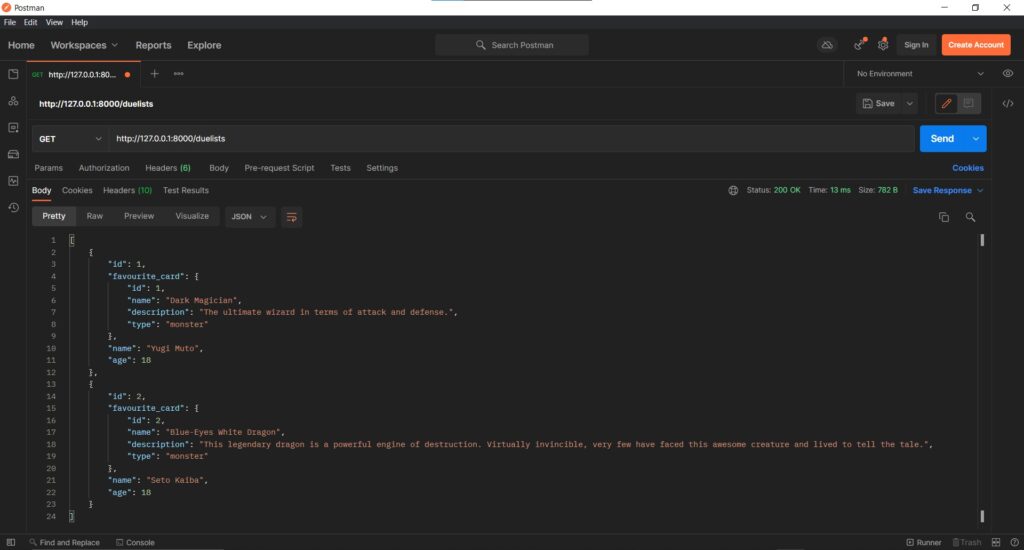
Among the gems in DRF serializers, RelatedField stands out as a powerful tool for working with ForeignKey fields in models. By default, when a ForeignKey is serialized, it appears as an integer representing the related object’s primary key. However, with RelatedField, we can transform this representation into the actual related object, making the output more informative and user-friendly.
Let's Dive into an Example:
To illustrate the usage of RelatedField, let’s consider an example with two models: DuelCard and Duelist. The Duelist model has a ForeignKey field, favourite_card, linking it to the DuelCard model.
class DuelCard(models.Model):
    name = models.CharField(max_length=100)
    description = models.TextField(max_length=1000, blank=True, null=True)
    type = models.CharField(choices=[('monster', 'Monster'), ('spell', 'Spell'), ('trap', 'Trap')], max_length=20)


class Duelist(models.Model):
    name = models.CharField(max_length=50)
    age = models.PositiveSmallIntegerField(blank=True, null=True)
    favourite_card = models.ForeignKey(DuelCard, on_delete=models.SET_NULL, blank=True, null=True)
The simplest serializer to handle this scenario would be as follows:
class DuelCardSerializer(serializers.ModelSerializer):
    class Meta:
        model = DuelCard
        fields = '__all__'


class DuelistSerializer(serializers.ModelSerializer):
    class Meta:
        model = Duelist
        fields = '__all__'
However, this basic serializer represents the favourite_card field as an integer, not the actual DuelCard object. To address this, we can enhance our serializer with RelatedField:
class DuelCardSerializer(serializers.ModelSerializer):
    class Meta:
        model = DuelCard
        fields = '__all__'


class DuelCardField(serializers.RelatedField):

    def to_representation(self, value):
        return DuelCardSerializer(value, context=self.context).data


class DuelistSerializer(serializers.ModelSerializer):
    favourite_card = DuelCardField(queryset=DuelCard.objects.all())

    class Meta:
        model = Duelist
        fields = '__all__'
With this modification, our Duelist serializer now includes the favourite_card field represented as the actual DuelCard object.
Making the Serializer Data Ready for Reception:
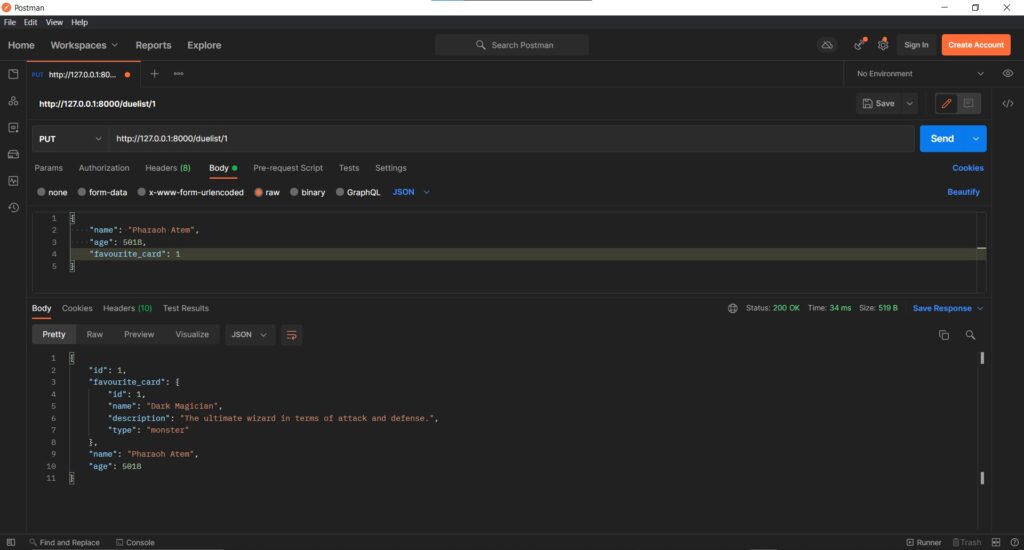
To enable the serializer to handle incoming data efficiently, we need to define to_internal_value. This method transforms the received data, whether it’s an integer, string, or any other type, into a model object. This also allows for data validation.
class DuelCardField(serializers.RelatedField):

    def to_internal_value(self, data):
        try:
            duel_card_id = data
            return DuelCard.objects.get(id=duel_card_id)
        except ValueError:
            raise serializers.ValidationError(
                'Duel card id must be an integer.'
            )
        except DuelCard.DoesNotExist:
            raise serializers.ValidationError(
                'Duel card does not exist.'
            )

    def to_representation(self, value):
        return DuelCardSerializer(value, context=self.context).data
Creating Class-Based Views for CRUD Operations:
To complete the process, we can create class-based views to perform CRUD operations using our serializer.
class DuelCardListCreateAPIView(ListCreateAPIView):
    queryset = DuelCard.objects.all()
    serializer_class = DuelCardSerializer


class DuelCardRetrieveUpdateDestroyAPIView(RetrieveUpdateDestroyAPIView):
    queryset = DuelCard.objects.all()
    serializer_class = DuelCardSerializer
    lookup_field = 'id'


class DuelistListCreateAPIView(ListCreateAPIView):
    queryset = Duelist.objects.all()
    serializer_class = DuelistSerializer


class DuelistRetrieveUpdateDestroyAPIView(RetrieveUpdateDestroyAPIView):
    queryset = Duelist.objects.all()
    serializer_class = DuelistSerializer
    lookup_field = 'id'
Sending Requests To These Views:
Conclusion:
In conclusion, Django REST Framework serializers, particularly RelatedField, offer a powerful and straightforward approach to handle ForeignKey fields and simplify the API development process. By optimizing the representation of data and seamlessly managing data reception, we can build robust APIs for CRUD operations with minimal lines of code. Embrace the potential of DRF serializers, and explore more possibilities to enhance your Django applications!
Share Your Thoughts:
I hope you found this article helpful in understanding the magic of DRF serializers and how RelatedField can streamline your API development process. If you have any comments, suggestions, or ideas for collaboration, please feel free to share them below. Let’s continue to improve our code together and create even better applications!